 UDM

Introduction
Ultimate Display Manager
Every display, one click away.
UDM gives you fast, direct control over your Windows display setup. Change layouts, resolution, refresh rate, orientation, scaling, HDR, cloning, brightness, color profiles, and supported display power from the taskbar or the Options window. Profiles and command-line tools are available when you need more control.
See UDM in action
Videos
1 / 2
Scroll or swipe to browse both videos
V1.6 update
Brightness & color
No admin required
Install it from the Microsoft Store and use it without administrator rights or UAC prompts.
Lite + Pro
The free app handles direct display control, while Pro adds profiles, quick actions, customization and more.
Built for real setups
From everyday laptops and desktops to complex multi-display layouts.
Stays on your PC
UDM stores its working data on your PC and does not send analytics or telemetry to a UDM-operated service.
Features
Everyday control
Switch displays right from the taskbar
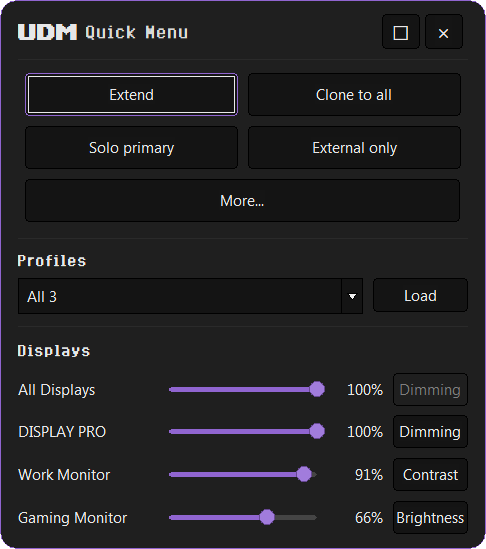
Left-click the tray icon, or press Alt + Win + P, to open the Quick Menu. Extend, clone, solo, or switch to internal or external displays, and set brightness for each display or all of them at once. Right-click the tray icon for the full menu of per-display actions.
- Primary, enable, and disable
- Extend, clone, and solo
- Resolution and refresh rate
- Orientation and scaling
- HDR and color profiles
- Brightness and dimming
- DDC/CI power, where supported
- Several changes at once
Layout editor
Arrange displays visually, then apply
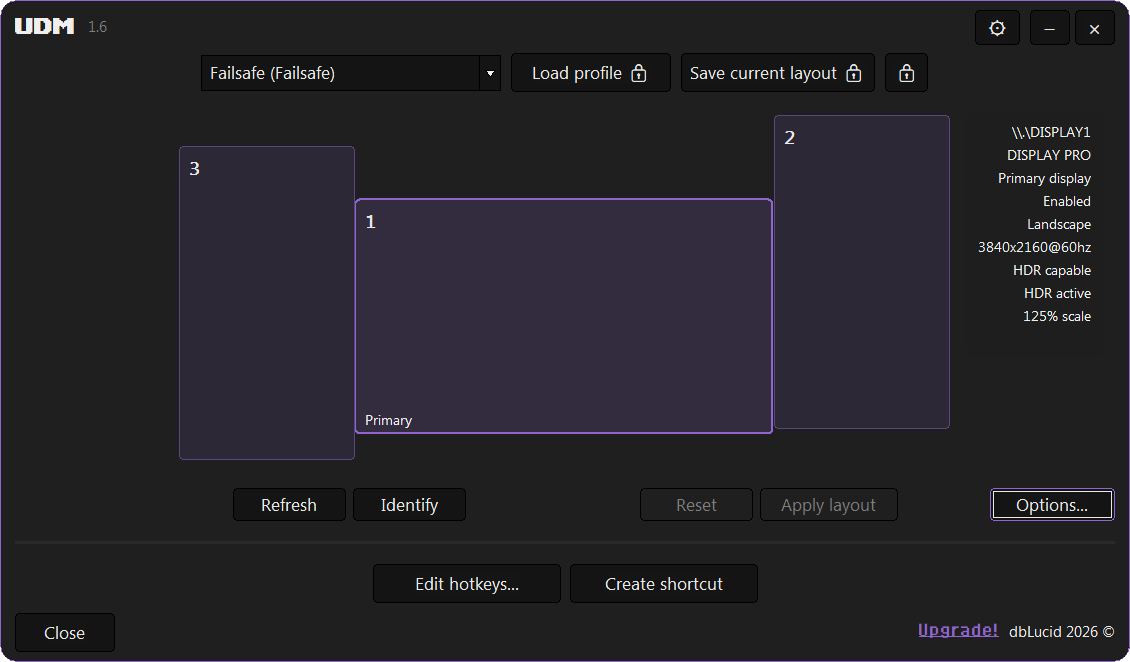
The layout editor shows your Windows arrangement as displays you can drag, snap, and multi-select. Arrange them visually, then select Apply layout when you are ready.
- Drag, snap, and move several displays together, with overlap and gap prevention
- Identify shows a large number on each physical display
- Double-click a display to open Display Properties
- Drag the display tabs under the canvas to reorder them

Profiles Pro
Save complete setups and switch in one step
A profile saves topology, primary display, resolution, refresh rate, orientation, HDR, DPI scale, positions, cloning, and supported power state. Apply it later in one step, without keeping UDM open.
- Load profiles from the tray, Quick Menu, hotkeys, shortcuts, or the CLI
- Optionally save brightness and color profile values
- Rename, delete and recover, and import or export
.udmpfiles
Hotkeys, shortcuts, and CLI
Keyboard, shortcut, and script friendly
Bind app and display actions to hotkeys, create Windows shortcuts with the built-in argument builder, or script UDM from Command Prompt, PowerShell, or Windows Terminal. Many commands run while the app is closed.
- Hotkey Editor in Lite and Pro, with profile and custom hotkeys in Pro
- Create shortcut builds UDM commands without memorizing syntax
- JSON output, dry runs, exit codes, and JSON recipe files
PowerShell
udm --display primary --set resolution=2560x1440 refresh=144
udm --display index:2 --set-primary
udm --display primary --brightness 70
udm --topology internal
udm --list-displays --json
udm --profile "Work Layout"
Failsafe recovery Pro
Keep a known-good layout ready, restore it from the tray or a hotkey, and use safe switching for complex profile changes.
Game Compatibility Mode
Closes UDM while selected games or apps are running, then reopens it afterward. Edit the watched list in Settings.
Display Properties
Open one display's settings, from resolution and HDR to brightness and color profiles, and apply several changes together.
Themes and customization
System, Light, or Dark themes with accent colors. Pro can show or hide Options controls and monitor-menu sections, and customize the Quick Menu.
Streaming and sharing privacy Pro
Hide monitor hardware names, serials, and identifiers in the app, copied details, and CLI output.
Settings transfer
Export and import settings and hotkeys as JSON from Settings or the CLI, or drag a settings or profile file onto the Options window to import it.
UDM Pro
Free to use. Pro when you need more.
UDM Lite is free on the Microsoft Store. UDM PRO is a one-time purchase that adds saved profiles, safer recovery, custom hotkeys, and deeper customization.
| Feature | Lite | Pro |
|---|---|---|
| Direct display controlLayouts, resolution, refresh rate, orientation, scaling, HDR, cloning, brightness, color profiles, and supported display power | Included | Included |
| Quick Menu, tray menu, and layout editor | Included | Included |
| Hotkeys, shortcuts, and CLI | App and display hotkeys, the shortcut creator, and direct display control from the CLI | Adds profile hotkeys, custom hotkeys, and Pro CLI commands for profiles, failsafe recovery, display names, and custom hotkeys |
| Game Compatibility Mode | Included | Included |
| Themes and accent colors | Included | Included |
| ProfilesSave, load, rename, delete, import, export, and recover layouts, optionally with brightness and color profile values; apply them without keeping UDM open | Not included | Included |
| Failsafe recovery and safe switching | Not included | Included |
| Reload last profile | Not included | Included |
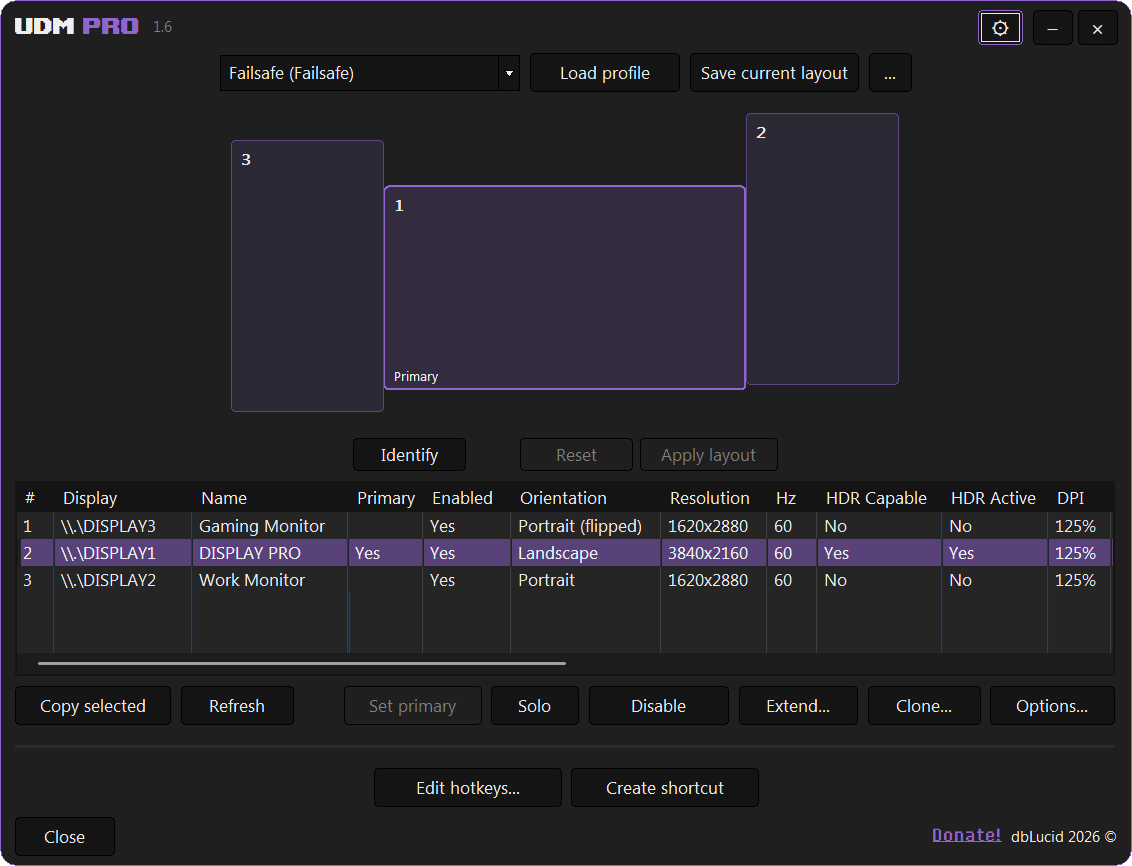
| Monitor listA detailed, customizable multi-column display table in the Options window | Not included | Included |
| Customizable display quick actionsChoose and arrange the six display buttons under the layout editor | Not included | Included |
| Customize UIShow or hide Options controls and monitor-menu sections, and customize the Quick Menu | Not included | Included |
| Streaming and sharing privacyHide monitor hardware names and identifiers in the app, copied details, and CLI output | Not included | Included |
| Display namingCustom display names you can also use in CLI arguments | Not included | Included |
| New Pro features as UDM grows | Not included | Included |
UDM is an independently developed, one-person project, and your purchase directly supports continued development.
How to upgrade
- Click Upgrade! inside the app
- Click any locked PRO control in the Options window
- Use
udm --upgradefrom the command line - Purchase the add-on from the Microsoft Store listing
Restoring your purchase
UDM PRO is a durable purchase tied to your Microsoft account. Reinstalling the app on the same account should restore access automatically. Please contact UDM if you have any issues, or see UDM PRO looks locked after purchase.
Changelog
What's new in UDM
Brightness, color profiles, and Quick Menu customization
- Added display brightness and dimming controls to Display Properties and the Quick Menu — including per-display sliders and an All Displays dimming slider!
- Adjust supported hardware brightness, contrast, HDR/SDR brightness, and software dimming from one consistent slider
- Added color profile switching for existing Windows SDR and HDR color profiles, plus shortcuts to Color Management and calibration tools
- Added brightness, dimming, and color profile commands for hotkeys, shortcuts, and the CLI
- Quick Menu can now be customized from Customize UI, including its lower action slots Pro
- Added a privacy setting that hides monitor hardware names and identifiers in the app, copied details, and CLI output Pro
- Profiles can now save brightness and color profile values, with separate settings to restore them Pro
- Reorder display tabs by dragging them in the layout editor
- Faster windows, smoother window rendering, and improved Quick Menu positioning and keyboard navigation
Previous releases
v1.5 Quick Menu, custom chrome, and UI polish
- Added the UDM Quick Menu — a compact popup for common display switching and app actions, available from the tray menu or the default Alt+Win+P hotkey!
- UDM's windows now use fully custom styling and borderless window chrome!
- Improved UI performance and greatly reduced window flickering; the Settings window now opens faster
- Added taskbar auto-hide options for profile and display changes Pro
- Added settings import/export from the Settings window's "..." menu
- Profiles and settings files can now be imported by dragging them onto the Options window
- Custom hotkeys can now run saved UDM CLI commands, and double-clicking a custom hotkey opens it for editing Pro
- Plus more reliability improvements and bug fixes
v1.4 Quick actions and game compatibility
- Added customizable display quick actions so PRO users can choose the six display buttons shown in the Options window Pro
- Added Game Compatibility Mode to automatically close UDM while selected games/apps are running, then reopen afterward
- Added a Game Compatibility list editor with defaults, presets, and custom watched executable names
- Added a Create shortcut... tray menu option directly under Edit hotkeys...
- Expanded settings, export/import, and CLI coverage for the new quick-action and compatibility settings
v1.3 Workflow, hotkey, and CLI customization
- Added custom hotkeys for app, display, layout, cloning, and profile actions Pro
- Added full CLI management for hotkeys and custom hotkeys, including dry-run and JSON support
- Added CLI shortcut creation
- Added a Create Shortcut argument builder so users can generate UDM commands without memorizing CLI syntax
- Added CLI settings export/import for migration and support
- Improved safe profile switching and its delay setting
- Polished the custom-hotkey editor and shortcut-builder fields
- General workflow, reliability, and release-prep polish
v1.2 Shortcut, hotkey, and layout editor polish
- Added a built-in "Create shortcut" window for UDM commands, profiles, and one-click actions
- Improved the Lite-to-PRO upgrade flow with a cleaner in-app promo window
- Added selected-display Options access for Lite and hidden-action-row setups
- Expanded direct display hotkeys for common topology and display actions
- Improved keyboard navigation across the app, including layout-editor selection
- Improved layout editor multi-drag previews, visual order, and fit-in-between behavior
- Strengthened layout editor overlap prevention, gap cleanup, and final drop settling
- Plus general UI polish and bug fixes
v1.1 Major CLI and workflow update
- Official UDM website launch!
- Full CLI implementation for direct display control, scripts, profile actions, recovery tools, and JSON output
- Fully control UDM without keeping the app open
- User-friendly CLI documentation
- Cleaner branding and user interface
- Display naming for easier display identification Pro
- Stronger failsafe recovery behavior Pro
- Profile export and direct profile launching improvements Pro
- Support logging improvements, including Lite availability
- Store purchase and restore improvements
- General reliability and packaging improvements
v1.0 Initial Microsoft Store release
- Released the tray menu, Options window, layout editor, theming system, and Display Properties window
- Added core controls for resolution, refresh rate, orientation, scale, HDR, cloning, and DDC/CI power
- Introduced PRO features including profiles, failsafe, the monitor list, UI customization, and profile hotkeys
- Included basic command-line support
Documentation
Guides and reference
Concise documentation for every part of UDM, from installation to the command line.
Get UDM
Free on the Microsoft Store for Windows 10 and Windows 11, with an optional one-time Pro upgrade.